Does WiFi Affect Sleep? What the Science Says and What to Do Tonight
I used to think I was just a bad sleeper.
For two years I’d wake up at 3am like clockwork. Groggy mornings. Brain fog by 2pm. I’d tried everything the wellness world recommends – magnesium, blue light glasses, sleep podcasts, blackout curtains, an expensive mattress topper. Some things helped a little. Nothing fixed it.
Then, on a whim, I moved my WiFi router out of the bedroom.
I slept through the night the first night. Then the second. Then the third. After two weeks I started wondering if it was a coincidence. After a month I stopped wondering.
Now – before anyone says this was placebo: I’m not here to tell you WiFi is making you sick. I’m not qualified to say that and neither is anyone else selling you a crystal pendant. What I am going to do is show you the actual science on WiFi, sleep, and EMF radiation, tell you what the research does and doesn’t support, and give you a set of practical changes you can test in your own bedroom tonight — for free – and see what happens.
Because here’s what I know for certain: you spend roughly 2,900 hours a year in your bed. Whatever is happening in that room for those hours matters more than almost any other environmental factor in your life.
Let’s figure out what’s actually going on.
The Question Nobody Thinks to Ask
If I asked you right now what’s in your bedroom, you’d probably say: a bed, maybe a TV, a phone charger, a lamp.
What you probably wouldn’t mention: the WiFi router two rooms over that’s pumping radio frequency radiation through your walls 24 hours a day. The Bluetooth speaker on your nightstand. The smart TV even when it’s “off.” The neighbor’s WiFi bleeding through from next door. Your phone, sitting on the nightstand, actively communicating with cell towers all night even while the screen is dark.
The average bedroom in 2026 contains between 8 and 15 active sources of electromagnetic field (EMF) radiation during sleeping hours. Most people know about zero of them.
Does that matter for sleep? That’s exactly what we’re going to find out.
What WiFi Actually Does While You Sleep
Most people think of WiFi as something that happens when they’re using it – streaming a show, loading a page, sending an email. Turn off the screen and the WiFi turns off too, right?
Wrong.
Your router broadcasts continuously, whether you’re actively using it or not. It’s constantly sending beacon signals – little pulses that announce its presence to any device that might want to connect. Your phone responds. Your laptop responds. Your smart TV responds. Your thermostat responds. All night long, your bedroom is filled with a constant back-and-forth of radio frequency signals that never stops until you physically turn the router off or it loses power.
Standard home WiFi routers typically operate at 2.4GHz or 5GHz frequencies. These are non-ionising radio waves – they don’t carry enough energy to break chemical bonds or damage DNA the way X-rays do. That’s the established science and it’s not in dispute.
What is being studied – and what’s far less settled – is what happens when you’re exposed to these frequencies for 8 continuous hours every night, night after night, for years. That’s the question the research is starting to answer. And some of what it’s finding is worth paying attention to.
What the Research Actually Says
Let’s be clear about something upfront: the science on WiFi and sleep is not settled. Anyone who tells you definitively that WiFi either definitely harms sleep or definitely doesn’t is overstating what we know. What we have is a growing body of research pointing in some consistent directions – and it’s worth understanding what those directions are.
The Melatonin Connection
This is the most researched and most consistently replicated finding in this space.
Melatonin is the hormone your body produces to regulate sleep. It starts rising around 9pm, peaks in the early hours of the morning, and tells your brain it’s time to sleep. Mess with melatonin and you mess with sleep – this is why blue light from screens is so well-established as a sleep disruptor. Blue light suppresses melatonin. Less melatonin means worse sleep. Simple.
Here’s the less-discussed part: EMF radiation from WiFi frequencies appears to affect melatonin through a similar mechanism.
The pineal gland – the small structure in your brain that produces melatonin — is extraordinarily sensitive to electromagnetic signals. It evolved to respond to the earth’s natural magnetic field as a biological clock. Research suggests it may interpret artificial EMF signals as light, triggering the same melatonin-suppression response that blue light causes.
Multiple studies have observed reduced melatonin levels in people with elevated EMF exposure. A study published in the journal Bioelectromagnetics found that exposure to power-frequency magnetic fields suppressed overnight melatonin production. More recent research has examined RF frequencies specifically. The findings aren’t uniform across all studies — some show effects, some don’t – but the mechanism is biologically plausible and the pattern is consistent enough that researchers consider it worth continued study.
What this means practically: if your bedroom has elevated RF from a router or multiple devices, and you’re sleeping with that exposure all night, your melatonin production may be subtly suppressed. Not eliminated — subtly suppressed. Enough to shift your sleep architecture. Enough to make you feel like a bad sleeper when you’re not.
Sleep Architecture Disruption
Beyond melatonin, several studies have looked at the actual structure of sleep — the cycles of light sleep, deep sleep, and REM – under conditions of EMF exposure.
A study published in the International Journal of Environmental Research and Public Health examined adults living within 300 metres of cell tower base stations versus those living farther away. The group with higher baseline RF exposure reported significantly more sleep disturbances, more difficulty falling asleep, and lower sleep quality scores.
Research from the Ramazzini Institute examined RF exposure at levels comparable to those found near cell towers and found changes in brain activity during sleep in exposed animals.
A 2020 meta-analysis examining multiple studies on RF-EMF and sleep concluded that evidence suggested non-thermal effects on sleep were plausible, though more large-scale human trials were needed.
Again — this isn’t proof that your WiFi is ruining your sleep. It’s evidence that the question deserves to be taken seriously rather than dismissed.
The Cortisol Angle
Sleep disruption and stress hormones run in a cycle. Poor sleep raises cortisol. High cortisol makes it harder to sleep. Some research suggests EMF exposure may independently elevate cortisol – the primary stress hormone – by activating the body’s stress response system.
If you’ve ever noticed that you feel vaguely wired and tired at the same time – exhausted but unable to fall asleep – this cortisol dysregulation is a plausible mechanism.
Oxidative Stress and Cellular Recovery
Your body’s most important cellular repair work happens during deep sleep. This is when your immune system consolidates, when your brain flushes metabolic waste products through the glymphatic system, when cellular damage from the day gets addressed.
A growing body of research – still preliminary – suggests that chronic low-level RF exposure may increase oxidative stress at the cellular level. Oxidative stress is the same mechanism behind aging, inflammation, and DNA damage. If your body’s repair processes during sleep are occurring in an environment of elevated oxidative stress, the quality of that repair may be compromised.
This is the area where the science is most speculative. But it’s also the area that most concerns researchers who are paying attention to this field.
The Honest Sceptic’s Corner
If you’re reading this thinking “this sounds like pseudoscience” — fair. Here’s the counterargument in full, because you deserve the complete picture.
Regulatory bodies consider WiFi safe. The WHO, the FCC, ICNIRP, and most national health agencies conclude that exposure to WiFi and RF radiation below regulatory limits does not pose a health risk based on the current body of evidence. That’s not a corrupt conspiracy — it’s a genuine scientific consensus based on the available data.
Many studies showing effects have methodological issues. Small sample sizes, inconsistent exposure measurements, difficulty controlling for confounding variables, and lack of replication are real problems in this research area.
The placebo effect is powerful for sleep. If you believe WiFi is hurting your sleep and then remove the router, you may sleep better because of the belief, not because of the physical change.
My own story could be confirmation bias. I moved the router. I slept better. Correlation isn’t causation. The full counterargument stands.
Here’s where I land after honest engagement with both sides: the precautionary principle makes sense in your bedroom. Even if the risk is small or uncertain, the cost of reducing your WiFi exposure while sleeping is essentially zero. Turning off a router costs nothing. If it improves your sleep, you’ve gained something real. If it doesn’t, you’ve lost nothing. That asymmetry — zero cost, potential benefit — makes the experiment worth running regardless of where you stand on the science.
Measure It First: What’s Actually in Your Bedroom?
Before you do anything else, I want you to know what your bedroom actually looks like from an EMF standpoint.
Most people are surprised. Some are shocked.
The tools that matter:
An RF meter measures the radio frequency radiation in a space. You hold it up, move it around the room, and watch the numbers. What you almost always find:
- The highest readings are closest to the router
- A router in or adjacent to the bedroom can produce readings of 10–1,000+ µW/cm² at close range
- With the router off, readings typically drop to near background levels (under 0.1 µW/cm²)
- Your phone on the nightstand, actively connected to WiFi and cell service, is often the second highest source
The TriField TF2 is the meter I use and recommend. It covers RF, magnetic fields, and electric fields in one device, it’s accurate, it’s beginner-friendly, and it doesn’t require an engineering degree to interpret.
👉 Check the TriField TF2 on Amazon
Once you have a reading, you have data. Not fear. Not guesswork. Actual numbers that tell you whether your bedroom EMF levels are something worth addressing or something you can stop worrying about entirely.
The Sleep-EMF Protocol: What to Change Tonight
Here’s what I’d recommend in order of impact. Start from the top and work down. Most people see meaningful results from the first two alone.
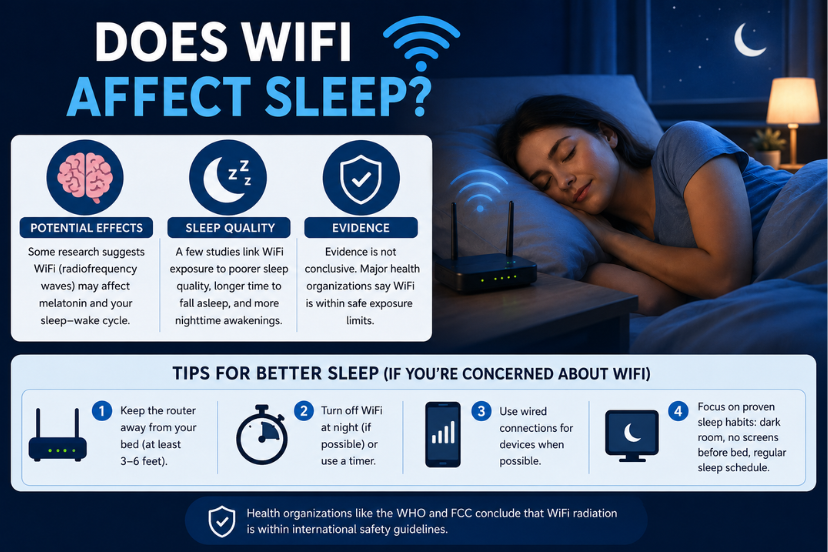
Change #1: Get the Router Out of the Bedroom (or Turn It Off at Night)
This is the single highest-impact change most households can make.
If your router is in or adjacent to your bedroom: move it. A hallway, a living room, a home office — anywhere that puts walls between the router and where you sleep. RF radiation drops off dramatically with distance and through walls.
If moving it isn’t possible (shared walls in an apartment, landlord restrictions, router controls shared access), the next best option is turning it off at night. You’re not using it when you’re asleep. The devices that “need” to be online overnight — security cameras, smart home hubs — can stay connected via Ethernet or you can allow exceptions.
The zero-effort solution: an outlet timer.
Plug your router into an outlet timer, set it to turn off at 10pm and back on at 6am, and you’ve automated 8 hours of nightly RF reduction without thinking about it again. These cost around $10–15.
This is genuinely one of the best-value EMF interventions available. Set it once, benefit every night indefinitely.
👉 Browse Outlet Timers on Amazon
Change #2: Phone Out of the Bedroom (Or Airplane Mode)
Your phone on the nightstand is not a passive object. All night it’s:
- Pinging cell towers to maintain signal
- Checking for WiFi and Bluetooth connections
- Running background app refreshes
- Receiving push notifications
- Syncing email, calendar, health data
Every one of those functions involves radio frequency transmission — from a device sitting inches from your head for 8 hours.
The fix is simple. One of three options:
Option A: Phone stays in another room overnight. Use a standalone alarm clock. This also eliminates the 11pm scroll habit that’s almost certainly delaying your sleep onset.
Option B: Airplane mode on. All radios off. Phone stays in the room but transmits nothing. Still works as an alarm clock.
Option C: Faraday bag. Phone goes in, bag gets sealed, all signals blocked completely. Test it: put the phone in the bag, seal it, call the number from another phone. If it goes straight to voicemail, the bag is working.
👉 Browse Faraday Phone Pouches on Amazon
Change #3: Audit Everything Else in the Bedroom
Most people fix the router and phone and stop there. But a modern bedroom has a surprising number of additional RF sources:
Smart TV — Even when “off,” many smart TVs maintain WiFi connections for automatic updates and remote wake functions. Unplug it overnight or physically turn off the power strip.
Bluetooth speaker or smart speaker — Alexa, Google Home, HomePod. These are active wireless devices operating 24/7. Move them out of the bedroom or unplug overnight.
Wireless earbuds charging case — Often overlooked. Charging cases for AirPods and similar devices emit low-level Bluetooth signals.
Smart thermostat — If mounted on a bedroom wall, it’s a wireless device transmitting constantly.
Baby monitor – If you have one: this is critically important. Many baby monitors operate at 2.4GHz — the same frequency as WiFi – and run continuously through the night at maximum power. Position them as far from the baby’s sleeping position as possible while still functional.
Neighbor’s WiFi – You can’t control this, but you can measure it. Your meter will tell you how much of your bedroom RF is coming from external sources. If it’s significant, this is where shielding products start making sense.
Change #4: Switch to Wired Where You Can
Every device you connect via Ethernet instead of WiFi is one fewer wireless transmitter in your environment.
This matters most for:
- Desktop computers – easy Ethernet switch, massive RF reduction
- Smart TVs – most have an Ethernet port; wired connection means WiFi radio can be disabled
- Gaming consoles – always faster on Ethernet anyway
- Main streaming device – Roku, Apple TV, Fire Stick all support Ethernet with an adapter
A household that moves its main devices to Ethernet often finds that router WiFi power can be turned down or the router turned off at night without losing any meaningful functionality.
Change #5: Add Targeted Shielding Where Your Meter Shows It’s Needed
If you’ve done steps 1–4 and your meter still shows elevated RF in the bedroom — particularly from external sources like neighboring WiFi networks, cell towers, or a smart meter on a shared wall — this is where physical shielding products become relevant.
RF Shielding Fabric & Bed Canopies
Silver-threaded shielding fabric is the most tested category of passive RF protection for home use. When properly installed around a sleeping area, it creates a measurably lower RF environment inside.
The critical rule: always verify with your meter inside the canopy. A quality canopy should reduce your readings by 95–99%. If it’s not showing that reduction, check for gaps – particularly at the bottom where the canopy meets the mattress.
👉 Browse RF Shielding Fabric on Amazon
EMF Shielding Paint
For walls adjacent to smart meters, electrical panels, or external cell antennas, conductive shielding paint applies like regular paint and can significantly reduce RF penetration through that wall. Requires proper grounding to be effective. Measure before and after.
What to skip:
Stickers, pendants, harmonizers, and “scalar wave” devices have no peer-reviewed evidence of measurable field reduction. The test is always the same: does your meter reading go down after you use this product? If it doesn’t, the product isn’t working regardless of what the company claims.
My Personal Bedroom Setup
Since I mentioned my own experience at the start, here’s exactly what changed in my bedroom and in what order:
Week 1: Moved the router from the bedroom to a hallway shelf about 20 feet away. Immediately felt different. Meter reading at my pillow dropped from ~45 µW/cm² to ~2 µW/cm².
Week 2: Added an outlet timer on the router. Off at 10:30pm, on at 6:30am. This eliminated the remaining router RF during sleep hours entirely.
Week 3: Phone started charging in the kitchen overnight. Used a $12 alarm clock. Meter reading at pillow now consistently under 0.1 µW/cm².
Week 4: Unplugged the Alexa in the bedroom. Moved it to the living room. Noticed I’d started reading before bed instead of asking Alexa to play sleep sounds — probably an improvement in itself.
Result after 30 days: I stopped waking at 3am. Not immediately, not dramatically — gradually. Sleep tracking showed more time in deep sleep. I felt better in the mornings consistently.
Am I certain this was the WiFi? No. Could it have been placebo, or one of the other sleep hygiene improvements I was making simultaneously? Possibly. But I’m not putting the router back to find out.
The 7-Night WiFi Sleep Experiment
Here’s how to run this as a personal experiment rather than taking my word for anything:
Night 1–3 (Baseline): Sleep normally. Write down your sleep quality on a 1–10 scale each morning. Note: time to fall asleep, wake-ups during the night, how you feel at 7am.
Night 4 (Intervention): Turn off the WiFi router completely before bed. Put phone in another room or on airplane mode. Note everything as before.
Night 5–7: Continue with router off. Track the same metrics.
Compare. If your numbers improve consistently, you have personal data. If they don’t change, you have data that suggests WiFi isn’t your particular issue — and you can stop worrying about it.
This experiment costs nothing and takes 7 days. It’s more valuable than any blog post, including this one.
FAQ: The Questions I Get Most Often
I’ve slept with WiFi on for years and I’m fine. Why should I change anything? You might be completely right that it’s not affecting you. Bodies vary in sensitivity. The experiment above is the only way to know if it matters for you specifically. If you sleep well and wake refreshed, your bedroom environment is probably fine. If you don’t – it’s worth testing.
Won’t turning off WiFi disconnect my security cameras? Yes, if they’re WiFi-based. Options: wire the cameras with Ethernet, use a router schedule that keeps security devices on a separate network, or accept that your home is secure enough for 8 hours with the cameras in recording-only mode. Many people find a smart plug or router firmware can maintain specific devices while turning off general WiFi broadcasting.
My partner won’t give up the router. What can I do? Focus on your side of the equation: your phone on airplane mode, your devices unplugged, your position in the bed as far from the router as possible. Distance is powerful. Even moving your pillow to the far end of the bed from the router wall can make a measurable difference.
What about 5G? Is that different from WiFi? 5G is cellular — it’s the signal from towers, not from your router. Sub-6GHz 5G is measurable with standard meters and operates on similar principles to WiFi. mmWave 5G (above 24GHz) is shorter range and doesn’t penetrate buildings as well. If you live near a 5G tower and your bedroom shows elevated RF even with all indoor devices off, that’s when external shielding becomes relevant.
Are WiFi meters accurate enough for home use? Consumer meters like the TriField TF2 are accurate enough to identify hotspots, compare before-and-after readings, and make practical decisions. They’re not laboratory instruments – they won’t give you a reading you’d publish in a journal. But for the purpose of “is this room high or low and did this change help” they’re entirely adequate.
Is this especially important for children? Yes, worth taking more seriously for kids. Children’s skulls are thinner, their brain tissue has higher water content, and their nervous systems are still developing. Several countries including France, Belgium, and Israel have adopted specific regulations limiting WiFi in schools and childcare settings. Keeping routers out of children’s bedrooms and off during sleeping hours is a reasonable precaution with zero downside.
What about electric blankets and mattress pads? Electric blankets produce significant ELF (extremely low frequency) magnetic fields – different from RF but worth being aware of. If you use one, heat the bed before you get in and unplug it when you sleep. Never sleep with an electric blanket switched on.
The Bigger Picture: Building a Low-EMF Sleep Environment
WiFi is the most controllable and highest-impact source for most households, but it’s worth thinking about your sleep environment holistically.
The ideal low-EMF bedroom:
- Router off or out of the room ✓
- Phone on airplane mode or in another room ✓
- Smart speakers unplugged or removed ✓
- TV unplugged at the wall ✓
- No charging cables running under or near the pillow ✓
- Bed positioned away from shared walls with electrical panels ✓
- Window shielding if external RF sources are high ✓
You don’t need all of these at once. Start with the top two. Measure. Adjust. Build from there.
The people who get the most out of this process aren’t the ones who panic-buy a canopy and hang it wrong. They’re the ones who measure their actual situation, make the free changes first, and add products only where the meter confirms they’re needed.
What to Buy: The Short List
Everything in this section is something I’ve tested or that has strong independent reviews. Nothing is here because someone paid to be here.
For measuring your bedroom: The TriField TF2 – covers RF, ELF magnetic, and electric fields. Tells you exactly what you’re working with. 👉 TriField TF2 on Amazon
For automating WiFi shutoff: An outlet timer – set it once, router turns off every night automatically. 👉 Outlet Timers on Amazon
For phone signal blocking: A Faraday pouch – seals the phone completely, verifiable by calling it. 👉 Faraday Pouches on Amazon
For high-RF bedrooms (external sources): RF shielding fabric or a bed canopy – verify effectiveness with your meter after installation. 👉 RF Shielding Fabric on Amazon
Final Word: You’re the Experiment
I started this post with a story about moving a router and sleeping better. I want to end it the same way – honestly.
I don’t know for certain that the router was the problem. What I know is that something in my sleep environment changed when I removed it, and my sleep improved, and I’ve kept it out of the bedroom for two years because the cost of keeping it out is zero.
That’s the whole argument. Not fear. Not certainty. Just a low-cost experiment with potential upside and no real downside.
Run the 7-night test. Measure your bedroom. Move the router. See what happens.
If nothing changes, you’ve lost a week and proven WiFi isn’t your issue — which is also valuable information.
If something changes, you’ve potentially solved a sleep problem that’s been costing you years of quality rest.
Either way, you’ll know. And knowing is always better than guessing.
Ready to start?
👉 Get the TriField TF2 — Measure Your Bedroom Tonight
👉 Automate Your WiFi Shutoff With an Outlet Timer
Found this helpful? Share it with one person who complains about bad sleep. You might change their nights.
Have a question about your specific setup – router placement, meter readings, apartment challenges? Drop it in the comments. I read every one.
Related posts on emfknowhow.com:
- How to Measure EMF in Your Home: A Step-by-Step Guide (2026)
- All About EMF Shielding in Your Bedroom: A Comprehensive Guide
- 5G EMF Radiation: A Full Risk Mitigation Guide
Medical disclaimer: Nothing in this guide constitutes medical advice. If you have concerns about sleep disorders or health symptoms, consult a qualified healthcare provider. EMF exposure guidelines vary by country – check your national regulatory body for current limits.
Affiliate disclosure: As an Amazon Associate I earn from qualifying purchases at no additional cost to you.